pstack is a set of skills, playbooks, principles, and agent prompts that make an AI agent do careful engineering. I worked through the full official guide for Cursor and wrote it down here in my own words, as the guide I wish I had before my first task. I have not run pstack on a real project yet, so this is the guide as written, not a field report. My own trial comes next.
pstack ships as a Cursor plugin, and installs in Claude Code from the same repository. The core idea fits any agent setup, and it comes down to one sentence: give the agent a goal and a way to check it, and it keeps going until the check passes.
What pstack Is
pstack lives in Cursor’s official plugins repository, at github.com/cursor/plugins, folder pstack. Its author is Lauren Tan, who writes as poteto. She has worked with millions of lines of code at Meta, Netflix, and Cursor, and she is on the React core team, where she helps build and maintain React Compiler.
Her starting point, in her own words from the repo’s README, is that AI writes too much slop code, and throughput without quality is not a goal to aspire to. If you want to go fast, go deep first. pstack is her answer: the same skills she uses every day to ship high-quality code at Cursor. It turns Cursor into a real engineering team. The goal is not to maximize lines of code. In fact, it is the opposite: pstack helps you write less, but higher-quality, code.
That is why the README promises what it calls fearless parallelism. When you can go deep on one agent and trust it to write good, verifiable code, you can parallelize with confidence. Start multiple agents with /poteto-mode and trust them to apply rigorous engineering principles.
Two more lines from the README shape how I use it. First, Cursor gives you the best of all worlds: every frontier model has its strengths and weaknesses, and many of pstack’s skills use multi-model workflows to take advantage of each model’s strengths. Second, the repo is open to change: fork it, improve it, make it yours, PRs are welcome.
pstack has four parts:
- Skills: instruction files the agent reads when you type their name. Most of pstack’s slash commands are skills.
- Playbooks: sequences of skills for one kind of task. There are 22 of them.
- Principles: 24 named rules for how to work, each its own skill.
- Agent prompts: the prompts pstack itself uses, including the ones for overnight runs and for building your own mode.
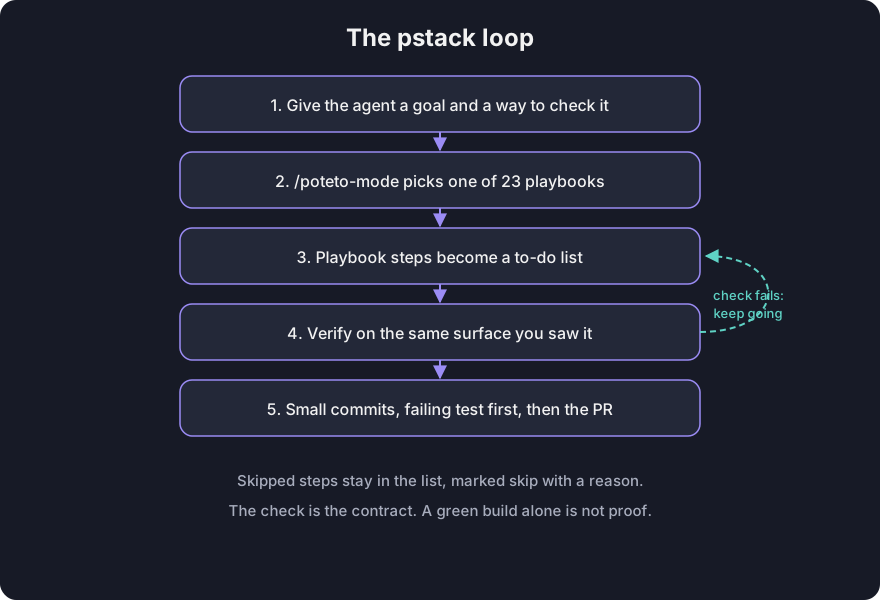
You give the agent a goal and a way to check it. An agent that can check its own work keeps going. That is the whole system, and everything below is machinery for making the check real.
Setup
Setup is two commands, then a new chat.
First, install the pstack plugin in a Cursor chat:
/add-plugin pstackIn Claude Code, add the repository as a marketplace first, then install the plugin from it:
/plugin marketplace add cursor/plugins
/plugin install pstack@cursor-plugins
Claude Code prefixes plugin commands and agents, so /poteto-mode becomes /pstack:poteto-mode and /setup-pstack becomes /pstack:setup-pstack. Claude Code also leaves auto-update off for third-party marketplaces by default, so enable it under /plugin if you want updates automatically.
Second, run /setup-pstack (or /pstack:setup-pstack in Claude Code). It detects the models you have access to, asks for a reasoning budget, and asks which model should handle each role, such as writing code or reviewing it. Anything you skip keeps its default. I cover what those choices mean in Choose the Models below.
Setup may also offer to build a verification skill (/create-verification-skill), which lets agents drive your app directly, and a formal verification skill (/create-formal-verification-skill) for concurrency or state-machine checks. If you are new, say yes to the verification skill. An agent that can check its own work keeps going, and a verification skill is how it checks a running app instead of a pile of files.
Then start a new chat so the new model rule applies.
Two helper commands are worth knowing before your first task:
- Not sure which skill fits? Type
/poteto-helpwith your question. It answers and hands you a prompt, without starting any work. - Got a reply that is thorough but hard to parse? Type
/bro. It restates the last message in plain human language with no jargon.
How /poteto-mode Picks a Playbook
You type /poteto-mode, then your goal. It picks the playbook that fits (one of 22) and runs the other skills as that playbook’s steps need them.
The common routes map straight to your goal: a read-only question goes to investigation, a defect to bug fix, new behavior to feature, a structure-only change to refactoring, and a measured slowness to perf. Large work, or anything without a clean match, goes to /figure-it-out.
Suppose you have a bug where duplicate rows show up in an export. That is a defect, so the bug fix playbook wins. The playbook copies its steps into a to-do list:
- Reproduce it.
- Binary search the cause (narrow it down by elimination).
- Plan the fix.
- Verify on the same surface where you first saw the bug.
- Stage the commits so the failing reproduction lands first, and open the pull request.
If the agent skips a step, the step stays in the list marked skipped with a reason. You see what it chose not to do.
The README lists all 22 playbooks that /poteto-mode picks from:
| Playbook | For |
|---|---|
| investigation | A read-only question: how does X work, why was Y built this way, are we sure. |
| bug fix | Reproduce a defect, root-cause it, and fix with runtime evidence. |
| perf | Trace a measured slowness and improve it against a baseline. |
| hillclimb | Sustained, scientific improvement of one metric against a target, looping hypotheses with before/after measurement and one commit per accepted win. |
| runtime forensics | Diagnose a live symptom (leak, idle-cpu spin, glitch) from instrumentation. |
| trace forensics | Diagnose a captured profiling artifact (cpuprofile, trace, spindump, heap snapshot). |
| feature | New or changed behavior, built from a named data shape. |
| refactoring | A behavior-preserving change to structure or shape. |
| prototype | A throwaway sketch to make a design or behavioral decision cheaply, or to settle an empirical fork by observing it. |
| visual parity | Pixel-exact UI equivalence between two implementations. |
| authoring a skill | Writing or editing a SKILL.md. |
| eval | Test how a skill or prompt change affects agent behavior, blinded. |
| babysit | Drive a PR or a stack to merge-ready: conflicts, review threads, CI. |
| shipping | Independently verify a green stack, then land the contiguous verified run bottom-up (through GitHub by default, or Origin when available). |
| autonomous run | Drive a long task to completion without stopping. |
| autopilot-full | Run independent PRs to merged with one owner per PR; a swarm verifies each code-ready head and rechecks every later change. |
| autopilot-stack | Autopilot-full without the merge: build and verify PRs for the operator to review and land, stacking a PR only on a PR it builds on. |
| session pickup | Resume or take over a prior agent’s in-flight work. |
| pause safely | Suspend in-flight work cleanly so it can be resumed later. |
| multi-phase plan | Work that spans phases or stacked PRs. |
| worktree cleanup | Reclaim disk by pruning merged or abandoned worktrees and stale iOS simulators, safety-gated. |
| opening a pr | Open a ready PR from small ordered commits with a conventional commits title and a briefing-style body. Invoked at the end of every other playbook. |
Pressing Enter attaches /poteto-mode to one message. To keep it on across turns, pick it from the / menu with Option+Enter on Mac or Alt+Enter on Windows. That turns it into a Cursor Custom Mode in the Agents Window and the CLI.
Write a Prompt That Can Pass or Fail
Here is the prompt for that duplicate-rows bug, written the fuller way the pstack guide shows it, with up to five parts. The details are made up.
- The goal: what is wrong or what you want. Duplicate rows appear in the export.
- What you already know: a failing job ID saves a search; a saved test input saves another.
- The real constraints: things like “reproduce first” that change what the agent does.
- The done check: it must be able to pass or fail. Here, with a retry forced mid-run, the 60,000-row fixture must export every row exactly once.
- The proof you want to see: here, row counts and duplicate keys before and after.
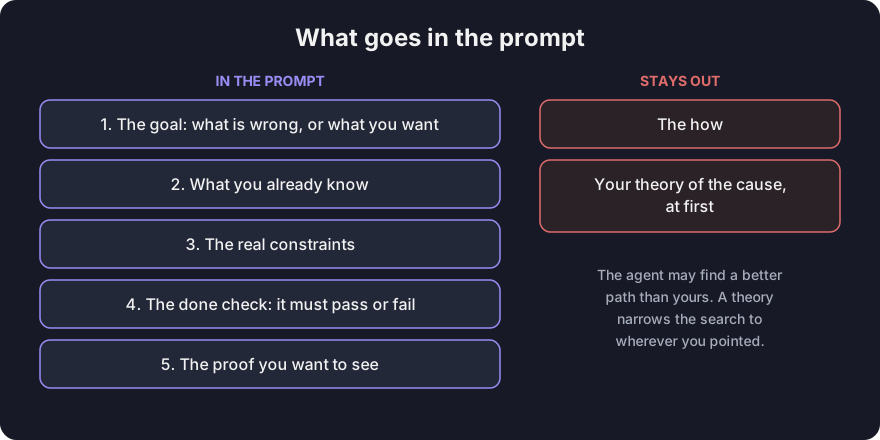
Two things stay out. First, the “how”: the agent may find a better path than yours. Second, at the start, your theory of the cause, which narrows the search to wherever you pointed.
For a noisy report, like a long thread, make the first step a restatement in the agent’s own words (or run /in-your-own-words). A misreading then costs one message, not one wrong fix.
Once the chat carries the context, follow-ups can be tiny: “Do it”, “Continue”, “Keep going”. When you change subjects, say “new task” so it picks a fresh playbook.
Parallel Agents
When you run several agents on one computer, they fight over files, ports, and build output.
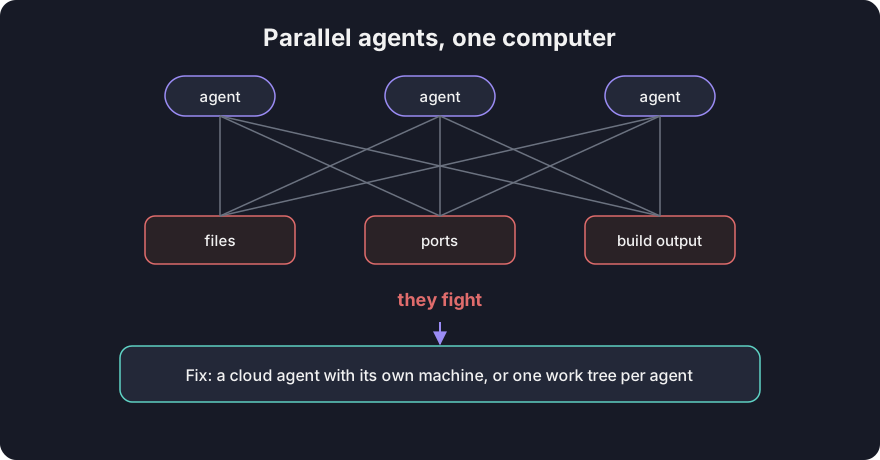
The cleanest fix is a cloud agent with its own machine and branch. If the work must stay local, give each agent its own worktree (a separate checkout on its own branch).
Understand the Code First
An agent usually fails in one of two ways: it misreads what you want, or it lacks context. Your prompt handles the first. These four commands handle the second.
/howexplains what the code does now: the runtime flow, the key types, and the non-obvious parts./whydigs up the history. It starts from source control, then searches whatever tools you have connected: tickets, docs, chat. If the record is thin, it says so. “Nobody wrote down why” is an answer, too./teachruns both and weaves one explanation, diagram by diagram. Ask it to convince you, and the explanation becomes an argument you can poke at./recallmines your own recent chats and the shared record, like tickets and earlier fixes, then briefs you on where things stand.
Do not skip these just because the agent will read the code anyway. Editing before tracing how something works tends to fix the symptom at the first plausible spot.
To keep an exploration read-only, say “Don’t change any code yet” so it routes to the investigation playbook. Ask what data it used, and it separates evidence from guesses.
Compare Designs Before You Commit to One
One attempt at a hard design locks in the first shape the model thought of. Three tools exist for getting a second opinion.
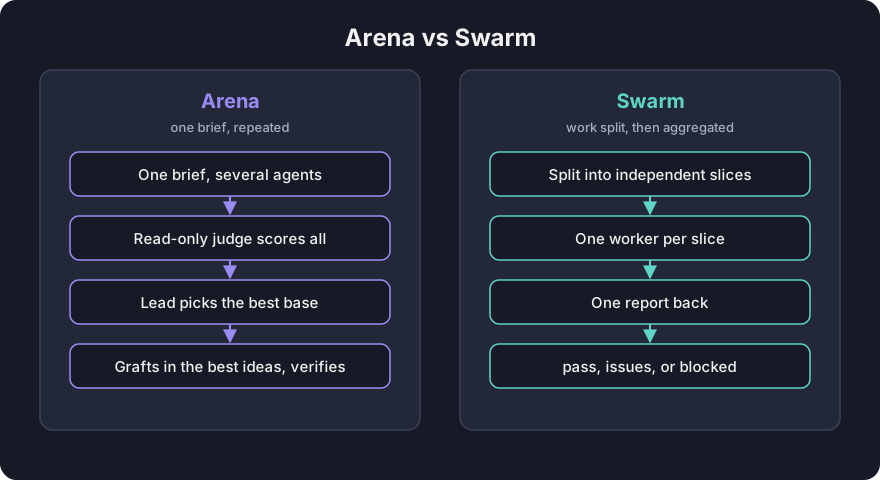
/arenagives one brief to several agents at once, each in its own directory. A read-only judge scores every candidate. The lead agent picks the best as a base, grafts in the best ideas from the rest, and verifies the result./architectuses Arena for you. It reads the code first, then drafts competing sketches, each starting with how callers use it, followed by types and signatures. Saywith checkpointto review the design before it builds./swarmis different. It fans out across independent slices of work, one worker each, and returns one aggregated report: pass, issues, or blocked.
Arena repeats one brief, then merges. Swarm splits the work, then aggregates. Most tasks need none of these extras, since /poteto-mode already scales scrutiny to the task. Reach for them when you want a second opinion or a design settled before writing code.
Interrogate: Review Before You Build
/interrogate sends your diff to reviewers running different model families, because different models have different blind spots. A finding two models raise independently is strong signal.
The lead sorts everything into four buckets (act on, consider, noted, dismissed) and gives a reason for each dismissal. It applies nothing by itself. Read the dismissals, too, and override them when you disagree.
Point /interrogate at a diff, not an abstract plan. With no code behind it, reviewers invent risks that never happen.
To answer open questions, build throwaway prototypes and compare them with real screenshots, timings, or runnable behavior. Write the plan last, once the design settles. Ask for small, verifiable pull requests, each ending in its own proof.
Build It
Each build task has its own playbook. Your prompt adds only what you observed:
- A bug: the symptom, and reproduce first.
- A feature: the behavior, and what must not change.
- A refactor: record today’s output first, then prove it is unchanged.
- A slow path: the measurement, like “startup takes 1.8 seconds.”
The playbook supplies the discipline you did not type: reproduce before fixing, name the data shape before implementing, record current behavior before restructuring, and measure before optimizing.
When a bug has a quick local test path, /tdd writes the smallest test that fails for the right reason, then implements the fix, then reruns the test. If the test would need brittle mocks, it says so and runs a real command instead.
Clean the Diff Before You Commit
/deslopremoves comments that narrate the code, guard code nothing supports, dead compatibility code, and unrelated edits. It ships in a separate plugin,cursor-team-kit. Without it, ask for the same outcome in plain words./unslopdoes the same for prose, like a pull request description./no-commentshands your comments to a fresh reviewer (Comment Sicko), because an author defends its own. The reviewer keeps almost nothing: license headers, public API docs, links, and behavior an outside dependency forces. Everything else goes.
When you open a pull request, its playbook already runs deslop and unslop for you. Cleanup is not optional polish. Padding is where the next bug hides.
Prove It Works
“It compiles” is not evidence. In the duplicate-rows prompt, done means every row exports exactly once, and the proof is the row counts and duplicate keys.
The reply should carry the exact commands and their output. If a check could not run, a good reply says inconclusive. A confident reply with no evidence is a red flag.
Match the check to the change:
- A command runs for real.
- A screen is walked in the running app.
- A parser replays saved input.
- A speed change compares profiles before and after.
- A storage change reads back the written value.
Check a Number: /benchmark-checklist
Someone says a change is 40% faster. A before-and-after number is easy to get wrong: a warm cache, or work that never ran inside the timed region, can fake a speedup.
/benchmark-checklist asks seven questions and requires evidence from a run for each:
- Name what limits the number, and say why it is not double.
- Did both sides run tuned like production?
- Does it break a physical limit?
- Did anything error?
- Does it repeat across alternating runs?
- Does it matter end to end?
- Did the work happen inside the timed region?
The verdict is faster, slower, no measurable difference, or inconclusive. Inconclusive means it could not name the limiter, or one side ran untuned.
The performance playbooks already run this check on their numbers. Run it yourself when you measured something outside them, or when someone else’s number looks too good.
Let the Agent Drive Your App
The agent also needs a scripted way to drive your app. /create-verification-skill interviews the repository, not you, and writes a project-local skill with sections for launch, a health check, driving the app, evidence, and cleanup. It proves the skill once end to end before handing it over. Commit it so every person and every agent drives the app the same way.
/maintain-verification-skill audits it as the app changes, ideally on a daily schedule.
Ship It
Suppose the duplicate-rows fix passes its check. Now it has to reach main.
To open the pull request, ask for small, ordered commits with evidence in the description. Then babysit, a playbook that watches your pull request, handles blockers in order: conflicts, review threads, then failing checks. Every known fix goes in one push so checks restart once. Babysit stops at merge-ready; it never merges, because merging is a separate decision.
To land a stack of pull requests built on one another, say “Land the stack.” shipping verifies each PR with a fresh agent, never the one that wrote it, and lands only the unbroken run of verified PRs from the bottom. A verified PR above an unverified one waits.
Overnight Runs
Now consider leaving an agent working while you sleep, for example migrating code to a new parser. First, what goes into the handoff, and second, when it is safe to send.
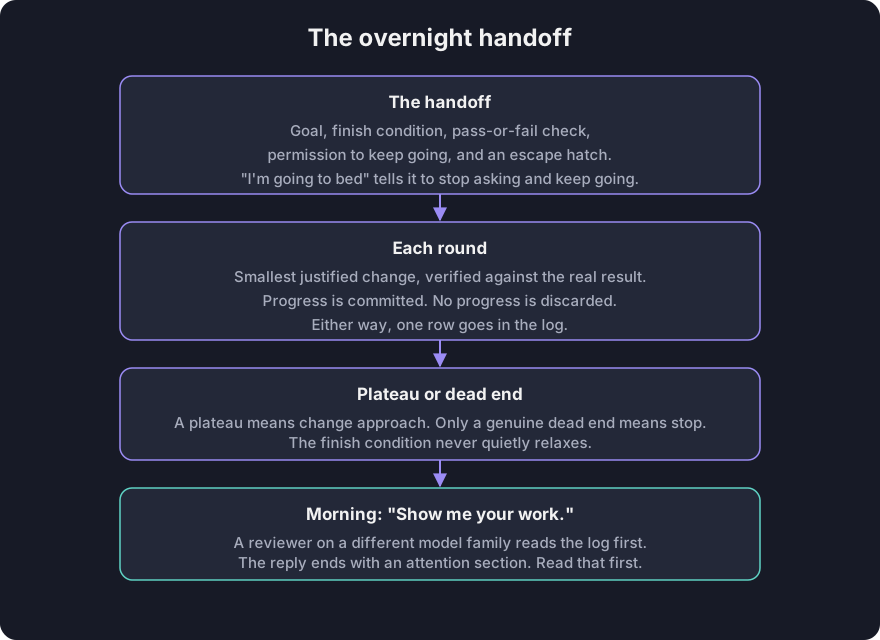
A good handoff has four parts: the goal, a finish condition (the same pass-or-fail check as before), permission to keep going, and an escape hatch if the agent gets stuck. “I’m going to bed” tells it to stop asking and keep going. “Done” means it turns the goal into checks each round can run.
Three extras help overnight runs stay clean: a fresh worktree keeps edits away from your open work; "Keep a decision log" has it record each decision for you to audit; and "Don't ask me before committing" answers in advance a question it would otherwise pause to ask.
/loop is Cursor’s built-in wake-up command, not a pstack skill. It rechecks the finish condition when something happens or on a timer. And the escape hatch matters: if truly stuck after a few hours, stop and write up why. That beats eight hours of reinterpreting the goal.
Before you send an overnight run, make sure you can trust it. An untrusted overnight run only makes unchecked work faster. Four things should hold first:
- You have done the task by hand or watched an agent do it, so you know what good looks like.
- The agent has your tools.
- Every step of the run proves its work and can stop the whole run if it misses the bar.
- Failures that repeat become checks.
Until all four hold, watch it run.
Each round does one thing: make the smallest justified change and verify it against the real result, not a stand-in. If a change makes progress, it is committed; if not, it is discarded. Either way, one row goes in the log. A plateau means change approach. Only a genuine dead end means stop. And the finish condition never relaxes without anyone noticing.
In the morning, say “Show me your work.” The log records a time, phase, decision, reason, an evidence pointer linking to the proof, and a result for each decision. Before replying, a reviewer on a different model family reads the log and the transcript. The reply ends with an attention section listing what deserves your scrutiny. Read that first.
A Queue, Not a Task
Some nights hold a queue rather than a single task:
autopilot-fullgives each independent pull request one owner agent. No owner merges on its own verdict; fresh verifiers must clear the exact patch that merges.autopilot-stackmerges nothing. You wake to a stack of pull requests in order, with a verdict on each, and land it yourself.- Cursor Projects handle work that lasts days and outlives any one agent: a coordinator thread writes task briefs and never writes code, delegating to helper agents running in the cloud.
One pitfall: a duration is not a finish condition. “Work on this for 4 hours” gives the agent nothing to check.
Principles
There are 24 principles in pstack, each a named rule for how to work, and each its own skill. /poteto-mode reads their index at the start of every multi-step task. You do not invoke them directly; you use their names to steer, and one phrase redirects more precisely than a paragraph:
- About to bolt a new adapter onto three old ones? Say “use subtract-before-you-add.”
- Claiming success because the build passed? Say “apply prove-it-works and show me the written records.”
- Two attempts about to write the same branch? Say “use separate-before-serializing-shared-state.”
The guide names five of them as examples of the decisions they cover:
- Turn advice you repeat into a lint, a check, or a script.
- Keep parallel work sane.
- Define what counts as proof.
- Decide where state, validation, and compatibility live.
- Decide how much to build and when to rethink the design.
The agent must say which decision a principle changed. A name with no decision behind it is name-dropping.
Make It Yours
/poteto-mode is one person’s style, and the machinery under it fits yours, too. Start small and add a skill or a check when the same failure shows up twice.
/automate-mereads your recent transcripts, asks which patterns are really you, and drafts your own-modeskill, opened as a pull request./reflectsends a finished session’s transcript to reviewers, then sorts proposals into accepted, rejected, and backlog. Approve only what would change a future decision./correctis for a mistake you fix by hand again and again. It ranks fixes on a ladder by how reliably they hold: first make the mistake impossible by design, then block it with a type or a lint, then catch it with a test. A written rule comes last, because nothing fails when it is skipped. Human review is not on the ladder. A reviewer catching the same mistake on every pull request is the problem.
Before you trust a skill change, test it blind (/eval). Give both versions the same task without telling the candidates it is an evaluation. One judge scores every output against a rubric under neutral labels. Read every output yourself; if you disagree with the judge, suspect the rubric before your own judgment.
Choose the Models
Back at setup, /setup-pstack asked about models. Here is what those questions mean.
The command detects the models you can use, asks for a reasoning budget (how hard the model thinks), and walks through each role pstack hands out: code delegates, judgment, and review panels. You choose a model or keep the default.
Your answers land in one small always-applied rule file (~/.cursor/rules/pstack-models.mdc in Cursor, or ~/.claude/rules/pstack-models.md in Claude Code) that every pstack skill reads. Skip a role and it keeps its default. Set a role to auto or inherit-parent, and its helper agents use whatever model your parent chat already runs on.
Out of the box, the README says code delegates (feature, refactoring, bug fix, perf, hillclimb), prose, and judgment all go to Opus 5.5 at xhigh, and no role runs above xhigh. Outside a review panel, Fable 5.2 runs only when you name it for a task or after two Opus 5.5 runs of the same brief fail their check. The default review panel is Fable 5.2 / Opus 5.5 / Gemini 4 Neon. /setup-pstack changes any of it.
More rigor costs more tokens. To spend less, pick a smaller reasoning budget, shorten a panel list, or save /poteto-mode for work that needs it.
Fourteen Pitfalls, Six Named
The last page of the guide has prompts to copy and 14 pitfalls. Here are six of them:
- Listing skills in the prompt. The playbook already sequences them. Name one only to override a default.
- A vague finish condition. “Make it better” gives the loop nothing to check.
- Leading with your theory. The agent searches wherever you pointed.
- Parallel agents in one worktree. They overwrite each other and the diff becomes archaeology. Use cloud agents or one worktree each.
- Trusting an unvetted number. Run
/benchmark-checklistfirst. - Reporting success off a green build. A build proves it compiles. Ask for the real command, flow, or stored value.
The other eight are in the guide’s pages.
Where I Would Start
That is the core of the guide. Many playbooks, the rest of the design tools, and several commands are not covered here; the official guide’s pages cover them in full.
My plan, as CodeKuli, is this: install pstack, say yes to the verification skill, and run one small bug fix through /poteto-mode with a written done check. If the agent’s reply carries the failing test before the fix and the passing test after, the loop works. The overnight and autopilot playbooks stay off until that loop has earned trust on small tasks first.
Conclusion
That is pstack in one sentence: give the agent a goal and a way to check it. Install it, run /setup-pstack, send one clear task, and check the evidence. If you get stuck, ask /poteto-help.
Comments
Comments load when this section comes into view.